主题
Python相关内容
修订记录
| 时间 | 内容 | 修订人 |
|---|---|---|
| 2026-03-07 | 创建 | 胡英万 |
一、Conda安装与环境变量配置
shell
#1.清华源地址下载
https://mirrors.tuna.tsinghua.edu.cn/anaconda/archive/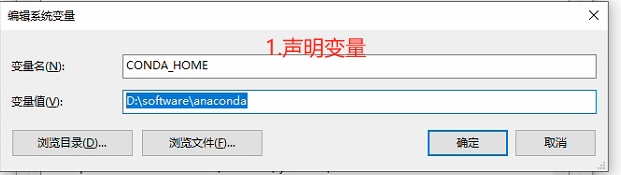
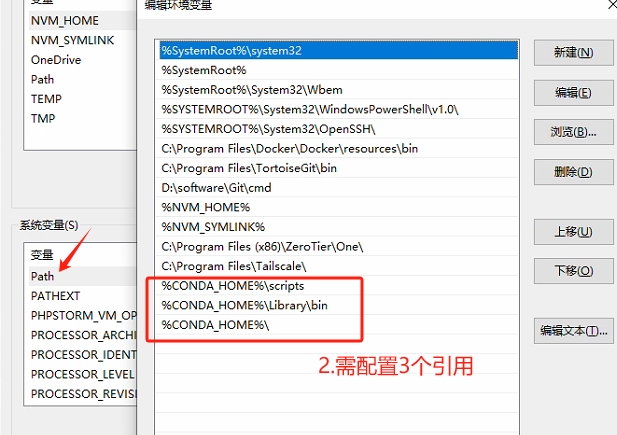
shell
# 添加清华源(方式一)
conda config --add channels https://mirrors.tuna.tsinghua.edu.cn/anaconda/pkgs/main/
# 添加conda-forge源
conda config --add channels https://mirrors.tuna.tsinghua.edu.cn/anaconda/cloud/conda-forge/
conda config --set show_channel_urls yes
# 手动编辑文件(方式二)
C:\Users\<你的用户名>\.condarc

conda clean -i # 清理缓存
#修改env目录
conda config --add envs_dirs D:\software\conda-env

#验证配置结果
conda config --show envs_dirs

#如何迁移已存在的环境
# 1.激活环境并导出
conda activate python311
conda env export > python311_env.yml
#2.删除旧环境
conda deactivate
conda remove -n python311 --all二、创建虚拟环境
shell
conda create -n <环境名> python=<版本号> # 创建环境
conda activate <环境名> # 激活环境
conda deactivate # 退出环境
conda env list # 查看环境
conda env remove -n <环境名> --all # 删除环境三、pip安装包
shell
pip install virtualenv # 安装虚拟环境的包
virtualenv venv # 创建虚拟环境四、python打包
bash
python -m PyInstaller -F -w -i pipeline.ico --add-data "pipeline.ui;." --add-data "pipeline.ico;." --hidden-import PyQt5.sip --name "银河流水线打包" pipeline.py